CORS and Effect: HTTP Headers, Cross-Origin Style

CORS refers to Cross-Origin Resource Sharing. It’s a terminology used in the context of browser requests. Now before we get deeper into CORS, we first need to understand origin and why the need for CORS
Origin and same origin policy
Origin is the source of a particular web request, where the request is originated or is being executed.
What qualifies as the same origin?
Two URLs have the same origin if they have the same
protocol
domain
port

Below URLs qualify as having the same origin as the above highlighted URL
Below URLs do not qualify as the same origin as the above highlighted URL
http://www.google.com/maps - Different protocol
https://google.com/maps - Different domain
https://ww.google.com:8080/maps - Different port
Same origin policy
To prevent different sites from accessing each other’s data (cookies, web storage, run scripts), same-origin policy is enforced by web browsers, and its enforcement dates back to 1996. This policy controls interaction between two origins when using HTTP requests. If you try accessing another origin, you’ll get a CORS error. In modern web browsers, CORS is disabled by default.
Let’s try this out! ✨
First, we’ll open dev tools on any website. Currently, I’m on https://www.google.com and let’s also spawn a node web server.
const express = require('express')
const app = express()
const port = 3000

app.get('/', (req, res) => {
  res.send('Hello World!');
})

app.listen(port, () => {
  console.log(`Example app listening on port ${port}`)
})
Now I have a NodeJS server running on port 3000.
We’ll make a simple fetch call in the browser console to get the response from our server.
fetch("<http://localhost:3000>").then(res => res.text()).then(x => console.log(x));
On executing this, we got an error like this
Access to fetch at '<http://localhost:3000/>' from origin '<https://www.google.com>' has been blocked by CORS policy:
No 'Access-Control-Allow-Origin' header is present on the requested resource.
If an opaque response serves your needs, set the request's mode to 'no-cors' to fetch the resource with CORS disabled.
and if we check the network tab, we see the following error

The error says we cannot access http://localhost:3000 as the origins mismatch and the server running at localhost should allow requests coming from the origin https://www.google.com in order for us to proceed.
Let’s make a few tweaks to our application code
const express = require('express')
const app = express()
const port = 3000

app.get('/', (req, res) => {
  res.setHeader('Access-Control-Allow-Origin', '<https://www.google.com>');
  res.send('Hello World!');
})

app.listen(port, () => {
  console.log(`Example app listening on port ${port}`)
})
and try making the same simple fetch call in the browser console.
Voila! 💫 It worked. We got a response.
Promise {<pending>}
Hello World!
Note that we added a special header [Access-Control-Allow-Origin](<https://developer.mozilla.org/en-US/docs/Web/HTTP/Headers/Access-Control-Allow-Origin>) to response headers. and we set its value to https://www.google.com. This is a way for the server to tell the browser that it trusts requests coming from [<https://www.gooogle.com>](<https://www.gooogle.como>) origin. We can also set the value of this header to “* ” wildcard which means it can allow requests from any origin and not just google.com.
Now let’s try something fancy! Let’s add a custom header to our simple fetch request
fetch("<http://localhost:3000>", {headers: {'a': 'b'}})
.then(res => res.text())
.then(x => console.log(x));
Oops! We’re again getting the CORS error
Access to fetch at '<http://localhost:3000/>' from origin '<https://www.google.com>' has been blocked by CORS policy:
Response to preflight request doesn't pass access control check:
No 'Access-Control-Allow-Origin' header is present on the requested resource.
If an opaque response serves your needs, set the request's mode to 'no-cors' to fetch the resource with CORS disabled.
An opaque response is a type of response that doesn't allow the web page to access the response's data, headers, or status.
Note that my emphasis was on simple fetch request. Read more about simple requests here. We made it fancy by adding a custom header to it. This simple request does not trigger a CORS preflight request. Oh! again a fancy term preflight request. Let’s get into that!
A preflight request is an OPTIONS request automatically made by the browser to check if the server is ready to accept the actual request, headers and allows the request from the given origin. This is a lightweight request and server usually responds with 204 No content if it agrees to the request conditions or can return an error. It is not triggered for simple requests.
Since our app.js does not have handling for that OPTIONS request, it is throwing the error. Let’s fix that
const express = require('express')
const app = express()
const port = 3000

app.get('/', (req, res) => {
  res.setHeader('Access-Control-Allow-Origin', '<https://www.google.com>');
  res.send('Hello World!');
})

app.options('/', (req, res) => {
  res.setHeader('Access-Control-Allow-Origin', '<https://www.google.com>');
  res.setHeader('Access-Control-Allow-Headers', 'a');
  res.sendStatus(204);
})

app.listen(port, () => {
  console.log(`Example app listening on port ${port}`)
})
Note that we also added a response header to allow the custom header without which we’d again be getting CORS error.
Now if we hit our fancy fetch request again, we’d notice that there are two requests that browser sent to the server. One was the OPTIONS request for which it got the below response
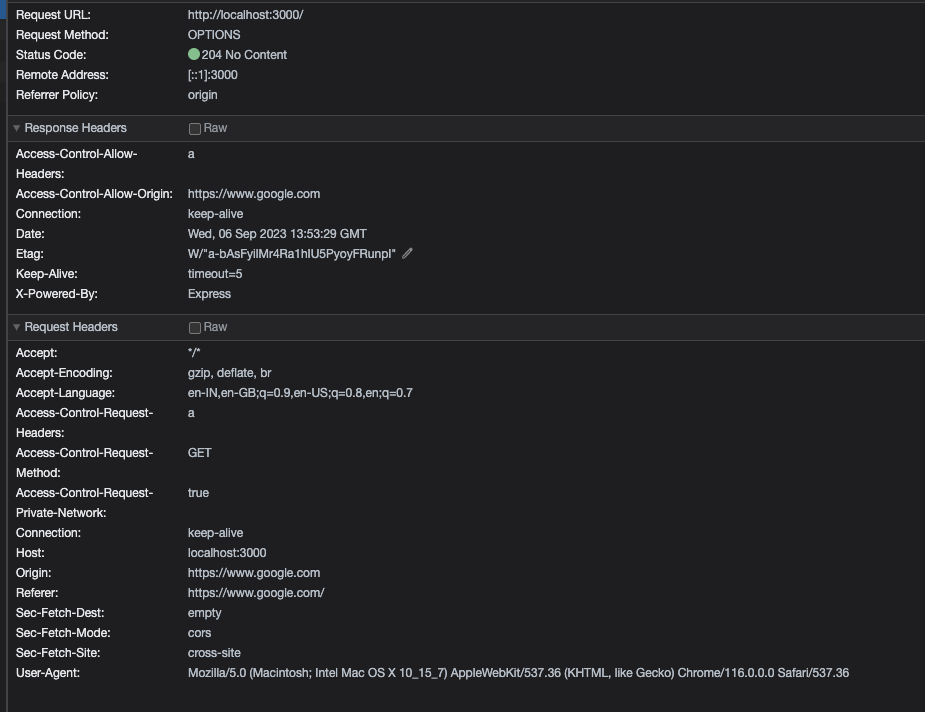
Here we can see that the server has allowed the origin and also the custom header.
and we got the 200 OK response for the GET request
Promise {<pending>}
Hello World!
How to block cross origin access
This is particularly useful in avoiding CSRF attacks.
How to allow cross origin access
Using the
Access-Control-Allow-OriginheaderChanging origins
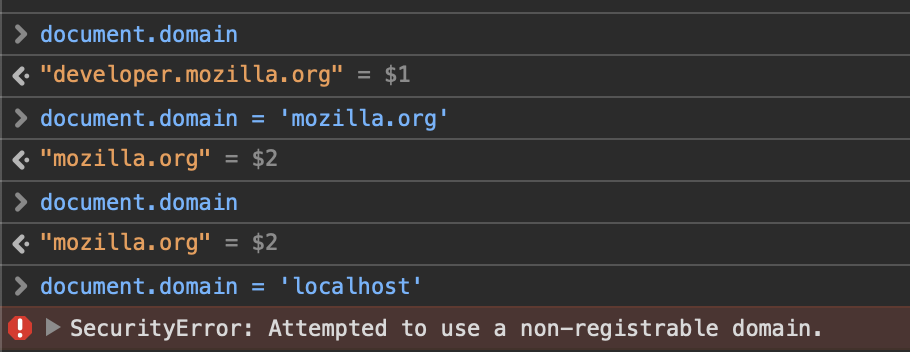
Some browsers provide the capability to change domain so that the requester can pose as the same domain and request can go through without the CORS error. However, this is limited to superdomains of the current domain only.
For e.g. I can change document domain for https://foo.bar.com to https://bar.com by doing this on
https://foo.bar.comdocument.domain = '<https://bar.com>'But I cannot change it to
http://localhost:3000[Not a superdomain]Google chrome has deprecated this citing security reasons, but Safari allows it.
PostMessage
https://developer.mozilla.org/en-US/docs/Web/API/Window/postMessage
About the author
Hey! I am a software engineer by profession. Passionate about Ruby, Database internals, optimization, distributed systems
Comments
Join the discussionNo comments yet. Be the first to comment.


